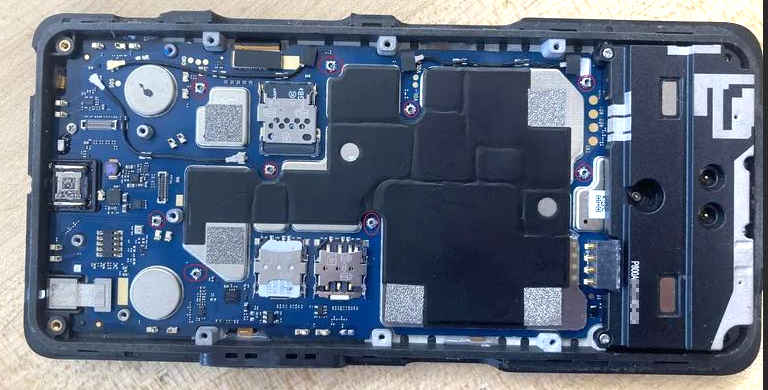
Internals of XP10 phone (from Reddit or someplace)
## October 13, 2026
I had my first interesting and meaningful conversation with AI today.  I had
been wrestling with the problem of how to back up my list of blocked numbers
on an Android phone for a while, and for all the searching I did I could not
find a solution that worked on more recent versions of Android.  There was
some out-of-date advice and a couple of old apps for the purpose all of which
no longer worked, because of tightened access restrictions to the "blocked
numbers" provider API.  Since Android 7.0, that presents database storage in
a uniform way which the dialer and SMS apps can reference when calls or texts
come in.  To be clear, once an inbound number is blocked it stays visible in
the normal app history, but I empty that out every so often and once that is
done, the blocked numbers can still be viewed in a specific screen but there
doesn't seem to be any easy way to export them into a simple list that could
be brought to another device.  Even trying to copy/paste off that display
doesn't work at all, as long-presses do nothing on it.

I had accumulated a *lot* of blocked numbers, every one of which also got
reported as spam.  Aside, on phones that have the capability to do that, you
should definitely report *every* junk call or text, because that *does* send
a packet of info up to your provider which helps them flesh out their database
of which calling numbers, whether they're faked caller-ID or coming from some
offshore-controlled sim farm.  When you get a "possible scam" ID on an incoming
call, that's partially because the cell provider knows that it's been problematic
in the past.  Anyway, I wanted to be able to save snapshots of that list as I
added to it over time, and I didn't see any easy way to do that.

There were several obstacles in the way:

   #  no native export/import facility after regular history cleared
   #  cannot manually copy text from the blocked-numbers display
   #  cannot use USB debugging to retrieve or store to the provider service

There were a few articles and postings suggesting either manually typing them
into a text file, or trying to take a bunch of screenshots and OCR them, but
all of that seemed incredibly klunky especially for a long list.  Others
suggested adding every spam number to a single "spam" contact entry before
blocking them, so they'd be in a retrievable user-accessible list, but I
had not done that over time and had *hundreds* of blocked numbers racked up
already.  I asked my phone manufacturer why there wasn't some simple way to
export these within the relevant apps, and the response was "nice idea, we
might think about adding that in the future".  Yeah, real helpful for *now*.

I started another series of queries this morning and got Google's "AI summary"
at the top, followed by "ask me anything", so what the hell, I banged in "I
want to back up my blocked numbers".  That began a chain of conversation which
eventually settled on an interesting workaround, after a bit of evasiveness and
non-working suggestions from the bot (which really should have known better).
Given the prevalence of postings from people asking the same thing with no
good answers, that's not a total surprise.  But I persisted more, trying to
back the bot into a corner and ask "why did the Android devs restrict this
so hard, it's not like the spam numbers that called ME are some kind of
secret".  After all, Android is Google, and Google's own bot should know the
rationale for that whether I had left it all still visible in my own call
history or not.  (A rather lame excuse about "privacy"...)

Longer story short, the bot finally offered that there's an automated way to
scrape actual *text* from the display, regardless of what app generated it.
It even offered "would you like me to write a Python script to help with
that?" ... I thought about it for a bit, and said "sure, how does it work?"
Whereupon it forthwith not only explained the mechanism, it cranked out a
first version of a workable script I could copy and run.    Reviewing that, I
discovered that Android has a native text-grabber utility built right into
the system that I never knew about!  The script simply calls out to "adb"
repeatedly and extracts the right info from the fairly messy XML dump that
the screen-grabber produces.  I was already rather blown away with where this
was going.

The "conversation" continued for a while, with me playing with various edits
to the script and pointing out a couple of minor flaws with it -- which the
bot almost immediately corrected and handled.  The end result was a bit of
Python which *can* retrieve all those blocked numbers fairly quickly into a
text file, and the final version even helpfully writes out a separate .VCF
file that can be imported into a new contact.  Holy shit.

Here is the python script we settled on.  I had offered minor corrections
like handling interrupts and also retrieving five-digit "short codes" which
are also sometimes spam, and the bot handled all that quite elegantly.  And
I watched the phone's screen scroll by itself and got my cleaned-up list(s)
written right to the PC I was using.  Pretty awesome, actually, given all
of the roadblocks I and many others had run into around this task.  It was
almost like talking to a human, nay, a *mentor* about dealing with Android.
My current phone is a Sonim XP10, which I bought because it's ruggedized
and generic unlocked Android that doesn't get in the way too much.  Because
I know I'm going to take it into the woods and beat the crap out of it, and
without Google trying to follow me around thankyouverymuch.  It's a big chonky
beast of a phone, but I totally don't mind that.  While a bit tedious, the
normal user interface allows disabling lots of backend stuff and locking it
down to a good extent.  Once I started exploring USB debugging I could squash
even more unnecessary fluff, so I'm pretty happy with the running setup by now.
So after my AI interaction and cleaning up some notes, I sent email to Sonim
asking them to revisit my question about blocked numbers backup, describing
what I and the Google-bot had accomplished this morning and how they should
think about trying to support this in a more native user-facing way.  It
should be self-explanatory, especially after noticing the *lack* of a certain
should-be-standard app feature that could have made all this more useful.
Date: Tue, 13 Oct 2026 07:31:14 -0500 Subject: Re: SONIM CASE NUMBER: 0174516 To: Sonim Support <support@sonimtech.com> I'd like y'all to revisit this case for a moment; I have some additional info that you might be interested in. I've been poking at the blocked-numbers extraction problem off and on for a while, and finally got a reasonable workaround. Used to be that adb shell content query --uri content://com.android.blockednumber/blocked might have been able to dump the numbers in the past, but that now hits security violations as that functionality has been locked down to the default dialer, SMS app, and root. I have a "SMS backup" app which backs up my SMS and call logs, but once the spam numbers are deleted out of history they're gone as far as that app sees. But are still in the blocked-numbers provider, visible by viewing the blocked numbers list, so that's sorta frustrating -- I can't just extract them to a text or VCF to put on another device, give to a friend as a helpful bootstrap for them, etc. A long conversation with google's AI turned up that Android has a native screen-scraping utility built in, called "uiautomator". Its subcommand "dump" basically scrapes all the readable TEXT off the screen and writes it to a local file. Rather than trying to OCR a bunch of sequential screenshots, this was a much more elegant approach. And google's AI helped me automate it by writing a Python script to invoke that via adb, and then scroll the blocked-numbers storage screen down, take a new dump, add it to the output, scroll down, etc. It turned out to be quite straightforward in that "workaround" context. It was even kind enough to generate a .VCF alongside in a later version of the script. Now, the only problem now is that your contacts and phone apps don't have any "block contact" mechanism, which is supposed to be STANDARD in such things. Why not? Turning a whole blocklist into a contact, moving a .VCF to another device, and invoking blocking for the whole pile would be an obvious shortcut to bootstrap previous information into a new place, and you DON'T PROVIDE IT. You should feel terrible about that omission, and it would be a nice community gesture if you provided a replacement dialer and/or contacts .APK on your website (not the google store) to remediate this error. You would also do well to look into producing a simple export / import app that requests READ_BLOCKED_NUMBERS and WRITE_BLOCKED_NUMBERS permissions in the manifest, and see if that could have effect without having to be assigned as the default dialer app (if even temporarily). |
Sonim has yet to respond to this, but if / when they do, it will appear here.
In the meantime, what got exported went back as a .VCF to the phone, and
got imported as one giant "spam1" contact, which merged nicely in with what
was already there.  I'll try to remember to maintain a new "spam2" contact
list as I report further scammers, and whether Sonim supplies an easy way
to copy the data elsewhere or not, I'll at least have my lists on hand.